I’m documenting this publicly because what happened to me does not appear to be a simple setup mistake. It looks like a structural deadlock in Meta’s business tooling, one that can trap an Instagram-first business in a state that is difficult, and in some cases impossible, to recover from through normal self-service flows.
This is not a rage post. It is a case study.
It is also a warning.
The setup
Like many small businesses, I started from Instagram.
That is no longer unusual. A lot of modern businesses do not begin with a Facebook Page, a Meta Business Manager admin hierarchy, or a carefully planned asset structure. They begin with an Instagram account, then gradually attach more tools: ads, business settings, Pages, connected accounts, and support systems.
Meta’s own business documentation reflects how central the business portfolio has become. A business portfolio is now the container for assets such as Facebook Pages, Instagram accounts, ad accounts, catalogs, and more. Meta also states that when a professional Instagram account and a Facebook Page are connected in Meta Business Suite, they end up under the same business portfolio.
That sounds clean in theory.
In practice, it creates a dependency chain.
The deadlock
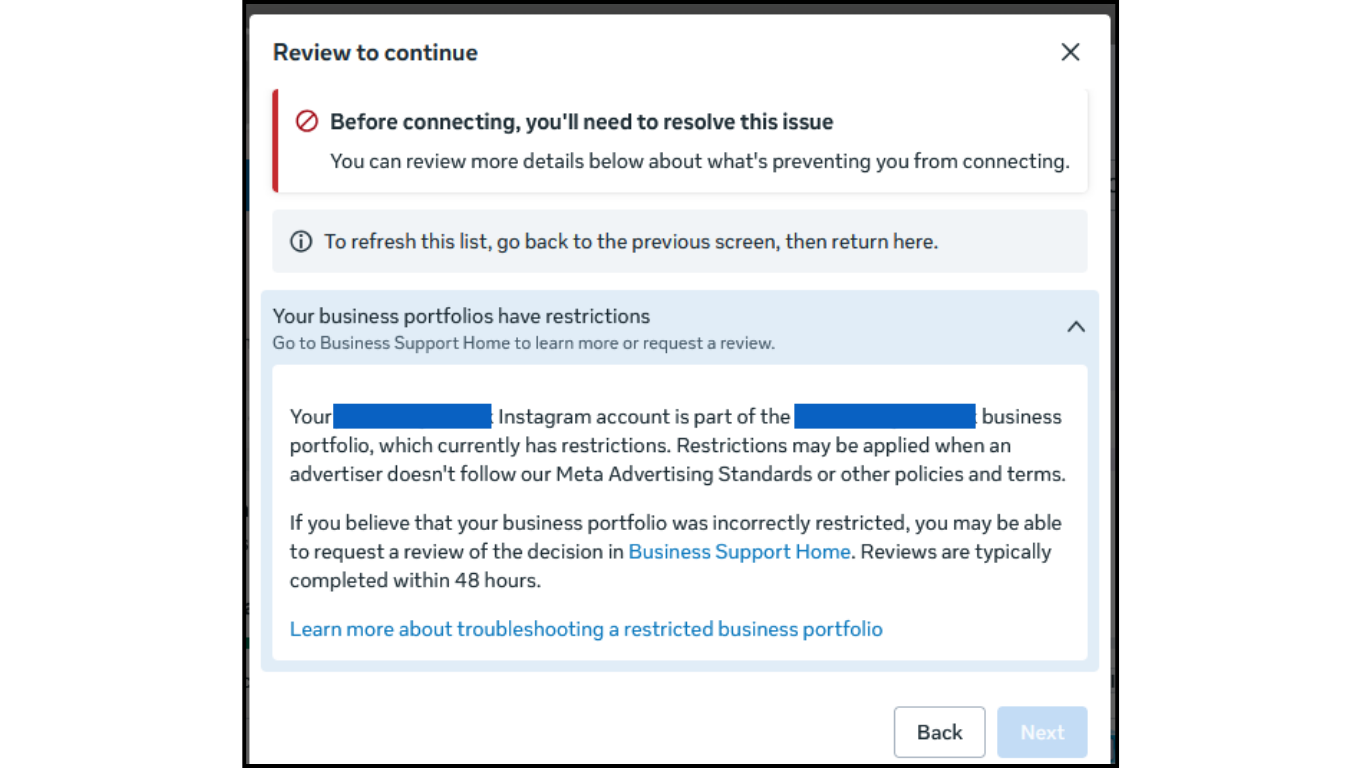
Here is the problem I ran into:
My Instagram business account became tied to a Meta business portfolio. That portfolio then became locked or otherwise inaccessible. At that point, the obvious next step should have been recovery.
But recovery itself depended on access paths that I did not have.
Meta’s Business Help and Business Support flows prominently route users through a Facebook-authenticated login. Meta’s own business help pages repeatedly present the entry point as “Log in to Meta for Business” and “Log in with Facebook,” including the Business Support Home flow and related restricted-account troubleshooting pages.
So the system effectively said:
- your Instagram account is inside this business portfolio
- your portfolio problem must be handled through business support
- business support expects Facebook-authenticated access
- but the account state prevents the missing Facebook linkage from being fixed in the normal way
That is the catch-22.
You need Facebook-linked business access to recover the business structure.
But you need the business structure recovered before you can complete the linkage cleanly.
Why this is not just “user error”
Someone reading this might say: maybe the account setup was messy.
That is possible in many cases. Meta’s system is large, layered, and easy to misconfigure.
But this issue goes beyond a bad click sequence.
Meta’s own documentation makes a few important things clear:
First, Instagram business assets are part of the business portfolio model.
Second, Meta’s connection rules are restrictive. Meta’s business help explicitly notes that a professional Instagram account must be in the same business portfolio as the Page you want to connect to, and that Instagram accounts can only be in one business portfolio at a time.
Third, the recovery and support architecture still leans heavily on Facebook-authenticated access for business-level problems.
Individually, each of these rules may make sense.
Together, they can create a state where an Instagram-first business is trapped:
- the Instagram asset is already bound to one portfolio
- the portfolio is locked or inaccessible
- the normal support path requires a Facebook-side identity path
- the lock blocks the relinking or reattachment that would otherwise fix it
That is not a loose inconvenience. That is a system design flaw.
What makes Instagram-first businesses vulnerable
This matters because Meta’s product stack still seems to assume a certain order of operations:
- start with Facebook identity
- build business structure around it
- attach Instagram as part of a managed portfolio
- use Business Support through that identity chain
But many real businesses now do the reverse.
- They start on Instagram.
- They grow on Instagram.
- They brand on Instagram.
They may even spend money on Instagram before they have a fully established Facebook-side admin architecture.
Meta’s own Instagram help also reflects a mixed identity world. Instagram documents connecting Facebook and Instagram through Accounts Center, and Instagram’s professional account setup flow describes Facebook login as optional in some contexts. Meanwhile, Meta also has a broader Account Recovery Hub for Facebook, Instagram, and Threads, plus separate Meta Verified support channels for eligible users.
That creates the impression of flexibility.
But when a business portfolio lock enters the picture, the flexibility seems to collapse back into one older assumption: business recovery still expects a Facebook-routed control path.
And that is exactly where an Instagram-first business can get stranded.
My experience with support
I contacted Meta’s business support team.
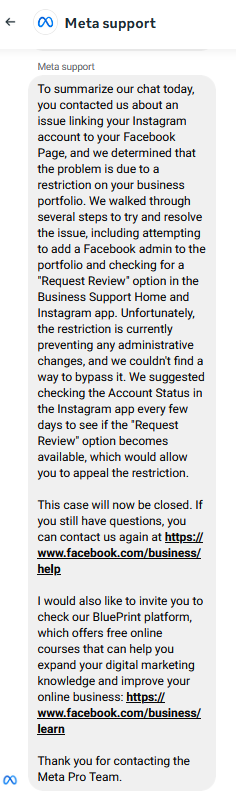
The important point is this: the issue was not solved by another linking attempt, another settings page, or another help-center article. The problem was recognized as a real deadlock.
That matters because it changes the nature of the problem.
Once support acknowledges the trap, this is no longer a “how do I link Instagram and Facebook?” question.
It becomes a manual intervention problem:
- restore admin access to the locked business portfolio, or
- manually release the Instagram asset from that locked portfolio
If no self-service path exists, then support cannot keep sending users back into the same loop.
Why I’m publishing this
I’m publishing this for three reasons.
1. To create a public record
A platform issue that only exists in private tickets is easy to dismiss as anecdotal. A documented sequence of events is harder to ignore.
2. To help other businesses identify the pattern
If you are Instagram-first and you are layering Meta business tools on top of an account that did not begin with a Facebook-first admin structure, this is a risk pattern worth understanding early.
3. To argue for a better recovery model
Meta should not require businesses to solve a locked identity graph using the very identity path that is blocked by the lock.
That is the design problem in one sentence.
What Meta should change
1. Add an Instagram-first business recovery path.
If the trapped asset is an Instagram business account, there should be a recovery route that starts there.
2. Allow manual asset release when support confirms a deadlock.
If an Instagram account is stuck inside a locked portfolio and the user can verify ownership, support should be able to release it cleanly.
3. Separate business-asset recovery from legacy login assumptions.
Modern businesses do not all start from Facebook. Meta’s recovery architecture should reflect that reality.
4. Make the dependency chain visible earlier.
If connecting an Instagram account to a Page or business portfolio creates hard ownership constraints later, users should be told that clearly up front. Meta’s docs explain pieces of this, but not the practical failure mode when access breaks.
A note to other founders and small businesses
If your business is built primarily on Instagram, do not assume that your recovery path is equally Instagram-native.
Before you attach business assets more deeply into Meta’s system, make sure you know:
- which Facebook identity, if any, is acting as the control layer
- which business portfolio actually owns the assets
- who has admin rights
- whether there is a second trusted admin
- what recovery path exists if that structure breaks
That may sound like back-office trivia.
It is not.
It is operational risk.
This is still ongoing
This article is part of an ongoing investigation, not a final verdict.
I am still documenting the sequence, preserving screenshots, and tracing where Meta’s official product design collides with the reality of Instagram-first businesses.
If Meta resolves this properly, I will update this article.
If other businesses have run into the same pattern, I would like to hear from them.
Because the real story here is bigger than one account.
It is about what happens when a platform built on one identity model tries to serve businesses that grew up on another.